 Amalgadon
Meet the Amalgadon Discord Bot
You can now use Amalgadon directly inside Discord. Add the bot to your server and use the/amalgadon command to look up cards, check what changed in a patch, and generate shareable board links without ever leaving your chat.
🤖 Add AmalgadonBot to your server →
Note
/amalgadon patch, for pulling up a patch's changes. Card names autocomplete as you type, boards are built one minion per slot, and minion effects are set with checkboxes instead of typed shorthand.Commands
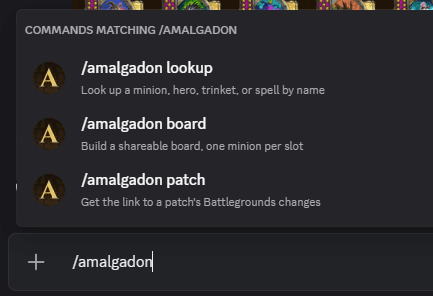
/amalgadon board
Generate a shareable board link. Each minion gets its own slot, and every slot autocompletes as you type — so you never have to remember a card's exact spelling.
/amalgadon board minion1:Sellemental minion2:Brann Bronzebeard minion3:Murozond
minion2 empty leaves a gap on the board. You can optionally give the board a name:
/amalgadon board minion1:Sellemental minion2:Brann Bronzebeard name:My Elemental Build
The bot replies with a link to your board, which Discord expands into a picture of it.
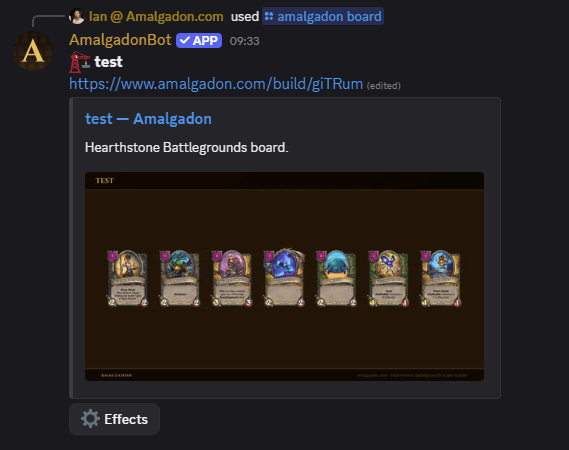
Minion effects
Every board comes with an Effects button. Press it and a form opens with a section per effect — Golden, Taunt, Divine Shield, Reborn and Windfury — each listing your board's minions. Tick the ones you want, submit, and the whole board updates at once. The link never changes, so anything already pasted in the channel still points at the right board.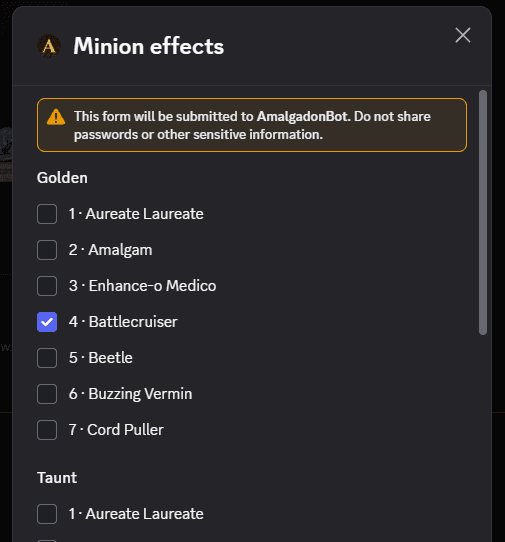
Only the person who posted a board can change its effects.
/amalgadon lookup
Look up a minion, hero, trinket, or spell by name. Start typing and pick from the list; the reply is a card with its tier, stats, tribe and text, linked to its full page on Amalgadon.
/amalgadon lookup name:Brann Bronzebeard
alakir finds Al'Akir — and a card that has left the pool is marked as no longer in it rather than quietly missing.
/amalgadon patch
Pull up what changed in a patch. It takes no arguments — run it and a dropdown appears listing the ten most recent patches, newest first and marked (latest), with the release date and how many cards changed under each, so you can tell at a glance whether a patch is worth opening.
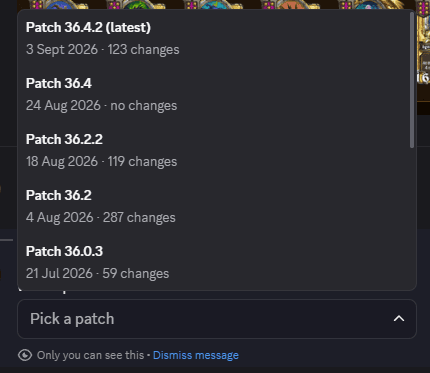
Pick one and the bot posts what was added, removed and changed, linked to the full patch notes on Amalgadon — and to the write-up too, when that patch has one.
The dropdown is only visible to you, so browsing it does not clutter the channel. The patch you pick is posted for everyone.
If the bot is not responding, a command is missing from your server, or you have found something it gets wrong, come and say so — it is the fastest way to get it looked at, and bugs reported there tend to be fixed the same week.
Support for the bot, plus patch chat and a place to share your boards.